IT
  
Attualmente si sta visualizzando la versione Italy del sito.
Volete passare al vostro sito locale?
Ultima edizione

Essential Apple User Magazine iPhone iOS 14 Guide Edizione speciale

English
12 Recensioni   •  English   •   Tech & Gaming (Apple)
Only €9,99
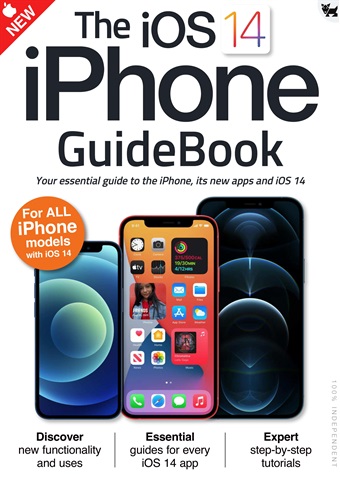
iOS 14 brought some great new features to your iPhone!
The user interface is much more compact, with Siri and phone calls now taking up much less space on the screen. There’s a great new Translate app for holding conversations in a wealth of different languages and Picture in Picture lets you continue watching your videos while you use your iPhone for other things. The Home screen has had a huge makeover, with on-screen widgets and a useful App Library and the ever-popular Messages app has had an overhaul, with pinned messages, some great new emoji designs and a revamped group messages feature.
Over the following pages we’ll show you how to get to grips with iOS 14, its apps and its features. The basics such as the keyboard, touchscreen gestures and the Home screen are covered, as are the wealth of bundled applications or apps. Then we go on to its more
advanced features like Siri, Find My and iCloud.
read more read less
Essential Apple User Preview Pages Essential Apple User Preview Pages Essential Apple User Preview Pages Essential Apple User Preview Pages Essential Apple User Preview Pages Essential Apple User Preview Pages Essential Apple User Preview Pages Essential Apple User Preview Pages

Essential Apple User

iPhone iOS 14 Guide iOS 14 brought some great new features to your iPhone! The user interface is much more compact, with Siri and phone calls now taking up much less space on the screen. There’s a great new Translate app for holding conversations in a wealth of different languages and Picture in Picture lets you continue watching your videos while you use your iPhone for other things. The Home screen has had a huge makeover, with on-screen widgets and a useful App Library and the ever-popular Messages app has had an overhaul, with pinned messages, some great new emoji designs and a revamped group messages feature. Over the following pages we’ll show you how to get to grips with iOS 14, its apps and its features. The basics such as the keyboard, touchscreen gestures and the Home screen are covered, as are the wealth of bundled applications or apps. Then we go on to its more advanced features like Siri, Find My and iCloud.


SELEZIONARE IL FORMATO:
Accesso immediato

Offerte digitali disponibili:

Numero speciale digitale iPhone iOS 14 Guide
 
9,99 / issue
Questo numero speciale non è incluso in un Essential Apple User abbonamento. Gli abbonamenti includono l'ultimo numero regolare e i nuovi numeri usciti durante l'abbonamento e partono da un prezzo minimo di €2,50 per numero

Opzioni di abbonamento
I risparmi sono calcolati sull'acquisto comparabile di singoli numeri su un periodo di abbonamento annualizzato e possono variare rispetto agli importi pubblicizzati. I calcoli sono solo a scopo illustrativo. Gli abbonamenti digitali includono l'ultimo numero e tutti i numeri regolari pubblicati durante l'abbonamento, se non diversamente indicato. L'abbonamento scelto si rinnoverà automaticamente a meno che non venga annullato nell'area Il mio account fino a 24 ore prima della scadenza dell'abbonamento in corso.

Essential Apple User issue iPhone iOS 14 Guide

Essential Apple User  |  iPhone iOS 14 Guide  


iOS 14 brought some great new features to your iPhone!
The user interface is much more compact, with Siri and phone calls now taking up much less space on the screen. There’s a great new Translate app for holding conversations in a wealth of different languages and Picture in Picture lets you continue watching your videos while you use your iPhone for other things. The Home screen has had a huge makeover, with on-screen widgets and a useful App Library and the ever-popular Messages app has had an overhaul, with pinned messages, some great new emoji designs and a revamped group messages feature.
Over the following pages we’ll show you how to get to grips with iOS 14, its apps and its features. The basics such as the keyboard, touchscreen gestures and the Home screen are covered, as are the wealth of bundled applications or apps. Then we go on to its more
advanced features like Siri, Find My and iCloud.
Per saperne di più leggere di meno
Exclusive to digital. Essential AppleUser Magazine brings you the very latest news, rumours, reviews and technical help for your Apple iPhone, iPad and the iOS along with Mac's, MacBooks, macOS, Apple Watch and all the accessories. This is the publication you will need to keep on top of the must know information and technical help from our team of Apple experts for your Mac, MacBook, iPhone, iPad, Apple Watch, HomePod and Apple TV hardware. If you want to stay informed with everything Apple click subscribe. 100% unofficial.

Come abbonati riceverete i seguenti vantaggi:


•  Uno sconto sul prezzo di vendita della rivista
•  Nuove edizioni consegnate sul tuo dispositivo il giorno stesso dell'uscita
•  Non perderete mai un numero
•  Siete protetti dagli aumenti di prezzo che potrebbero verificarsi nel corso dell'anno

Riceverete 6 edizioni durante un periodo di 1 anno Essential Apple User abbonamento alla rivista.

Nota: le edizioni digitali non includono gli articoli di copertina o i supplementi che si trovano nelle copie stampate.

Il vostro acquisto su Pocketmags.com può essere letto su una delle seguenti piattaforme.


Potete leggere qui sul sito web o scaricare l'applicazione per la vostra piattaforma, ricordandovi di effettuare il login con il vostro nome utente e la vostra password Pocketmags.

Apple Pocketmags Online Pocketmags Google Pocketmags
L'app Pocketmags funziona su tutti i dispositivi iPad e iPhone con iOS 15.6 o versioni successive, Android 8.0 o versioni successive e sui tablet Amazon Fire dal 2018 in poi, anche se i possessori di modelli Fire precedenti possono controllare l'Amazon Appstore direttamente sul proprio dispositivo per confermare la compatibilità. Per gli utenti iOS, consigliamo di utilizzare un dispositivo in grado di eseguire l'ultima versione di iOS per ottenere prestazioni e stabilità ottimali, poiché l'hardware più datato con minore potenza di elaborazione e RAM potrebbe risentire di un caricamento delle pagine più lento o di occasionali problemi di stabilità dovuti ai limiti di memoria del dispositivo. In alternativa, il nostro lettore web funziona con qualsiasi browser moderno compatibile con HTML5, anche se consigliamo Chrome o Firefox per un'esperienza ottimale su PC e Mac.
4,5
/5
Basato su 12 Recensioni dei clienti
5
8
4
2
3
2
2
0
1
0
Visualizza le recensioni

Highly interesting

Informative for those customers of Apple Recensito 25 aprile 2022

Very helpful

All the details needed to begin using Apple products Recensito 17 luglio 2019

Articoli in questo numero


Di seguito una selezione di articoli in Essential Apple User iPhone iOS 14 Guide.

Chat
X
Supporto Pocketmags