Sie sehen gerade die Germany Version der Website.
Möchten Sie zu Ihrer lokalen Seite wechseln?
Neueste Ausgabe

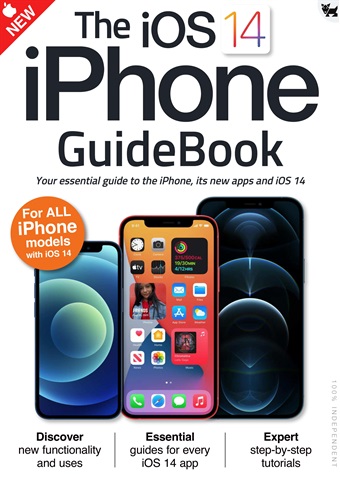
Essential Apple User Magazine iPhone iOS 14 Guide Sonderausgabe

English
12 Bewertungen   •  English   •   Tech & Gaming (Apple)
Only €9,99
iOS 14 brought some great new features to your iPhone!
The user interface is much more compact, with Siri and phone calls now taking up much less space on the screen. There’s a great new Translate app for holding conversations in a wealth of different languages and Picture in Picture lets you continue watching your videos while you use your iPhone for other things. The Home screen has had a huge makeover, with on-screen widgets and a useful App Library and the ever-popular Messages app has had an overhaul, with pinned messages, some great new emoji designs and a revamped group messages feature.
Over the following pages we’ll show you how to get to grips with iOS 14, its apps and its features. The basics such as the keyboard, touchscreen gestures and the Home screen are covered, as are the wealth of bundled applications or apps. Then we go on to its more
advanced features like Siri, Find My and iCloud.
read more read less
Essential Apple User Preview Pages Essential Apple User Preview Pages Essential Apple User Preview Pages Essential Apple User Preview Pages Essential Apple User Preview Pages Essential Apple User Preview Pages Essential Apple User Preview Pages Essential Apple User Preview Pages

Essential Apple User

iPhone iOS 14 Guide iOS 14 brought some great new features to your iPhone! The user interface is much more compact, with Siri and phone calls now taking up much less space on the screen. There’s a great new Translate app for holding conversations in a wealth of different languages and Picture in Picture lets you continue watching your videos while you use your iPhone for other things. The Home screen has had a huge makeover, with on-screen widgets and a useful App Library and the ever-popular Messages app has had an overhaul, with pinned messages, some great new emoji designs and a revamped group messages feature. Over the following pages we’ll show you how to get to grips with iOS 14, its apps and its features. The basics such as the keyboard, touchscreen gestures and the Home screen are covered, as are the wealth of bundled applications or apps. Then we go on to its more advanced features like Siri, Find My and iCloud.


FORMAT AUSWÄHLEN:
Sofortiger Zugang

Verfügbare digitale Angebote:

Digitale Sonderausgabe iPhone iOS 14 Guide
 
9,99 / issue
Diese Sonderausgabe ist nicht in einer Essential Apple User Abonnement. Das Abonnement enthält die letzte reguläre Ausgabe und die während des Abonnements erscheinenden neuen Ausgaben und ist bereits ab einem Betrag von €2,50 pro Ausgabe

Abonnement-Optionen
Die Ersparnisse werden auf der Grundlage eines vergleichbaren Kaufs von Einzelausgaben über einen annualisierten Abonnementzeitraum berechnet und können von den angegebenen Beträgen abweichen. Die Berechnungen dienen nur zu Illustrationszwecken. Digitale Abonnements beinhalten die letzte Ausgabe und alle regulären Ausgaben, die während Ihres Abonnements erscheinen, sofern nicht anders angegeben. Das von Ihnen gewählte Abonnement verlängert sich automatisch, wenn es nicht bis zu 24 Stunden vor Ablauf des laufenden Abonnements im Bereich Mein Konto gekündigt wird.

Essential Apple User issue iPhone iOS 14 Guide

Essential Apple User  |  iPhone iOS 14 Guide  


iOS 14 brought some great new features to your iPhone!
The user interface is much more compact, with Siri and phone calls now taking up much less space on the screen. There’s a great new Translate app for holding conversations in a wealth of different languages and Picture in Picture lets you continue watching your videos while you use your iPhone for other things. The Home screen has had a huge makeover, with on-screen widgets and a useful App Library and the ever-popular Messages app has had an overhaul, with pinned messages, some great new emoji designs and a revamped group messages feature.
Over the following pages we’ll show you how to get to grips with iOS 14, its apps and its features. The basics such as the keyboard, touchscreen gestures and the Home screen are covered, as are the wealth of bundled applications or apps. Then we go on to its more
advanced features like Siri, Find My and iCloud.
mehr lesen weniger lesen
Exclusive to digital. Essential AppleUser Magazine brings you the very latest news, rumours, reviews and technical help for your Apple iPhone, iPad and the iOS along with Mac's, MacBooks, macOS, Apple Watch and all the accessories. This is the publication you will need to keep on top of the must know information and technical help from our team of Apple experts for your Mac, MacBook, iPhone, iPad, Apple Watch, HomePod and Apple TV hardware. If you want to stay informed with everything Apple click subscribe. 100% unofficial.

Als Abonnent erhalten Sie die folgenden Vorteile:


•  Ein Rabatt auf den UVP Ihrer Zeitschrift
•  Neue Ausgaben werden am Erscheinungstag auf Ihr Gerät geliefert
•  Sie werden keine Ausgabe verpassen
•  Sie sind vor Preiserhöhungen geschützt, die später im Jahr eintreten können

Sie erhalten 6 Ausgaben während eines 1-Jahres Essential Apple User Zeitschriftenabonnement.

Hinweis: Die digitalen Ausgaben enthalten nicht die in den gedruckten Exemplaren enthaltenen Umschlagseiten oder Beilagen.

Ihr Kauf hier bei Pocketmags.com kann auf jeder der folgenden Plattformen gelesen werden.


Sie können hier auf der Website lesen oder die App für Ihre Plattform herunterladen. Vergessen Sie nicht, sich mit Ihrem Pocketmags-Benutzernamen und Passwort anzumelden.

Apple Pocketmags Online Pocketmags Google Pocketmags
Die Pocketmags-App läuft auf allen iPad- und iPhone-Geräten mit iOS 15.6 oder höher, Android 8.0 oder höher sowie Amazon Fire-Tablets ab dem Jahr 2018. Besitzer älterer Fire-Modelle können jedoch den Amazon Appstore direkt auf ihrem Gerät aufrufen, um die Kompatibilität zu prüfen. Für iOS-Nutzer empfehlen wir die Verwendung eines Geräts, das die neueste iOS-Version ausführen kann, um eine optimale Leistung und Stabilität zu gewährleisten. Ältere Hardware mit geringerer Prozessorleistung und weniger RAM kann aufgrund von Speicherbegrenzungen des Geräts zu einer langsameren Seitenanzeige oder gelegentlichen Stabilitätsproblemen führen. Alternativ funktioniert unser Web-Reader mit jedem modernen, HTML5-kompatiblen Browser, wobei wir für die beste Nutzung auf PC und Mac Chrome oder Firefox empfehlen.
4,5
/5
Basierend auf 12 Kundenrezensionen
5
8
4
2
3
2
2
0
1
0
Rezensionen ansehen

Highly interesting

Informative for those customers of Apple Überprüft 25 April 2022

Very helpful

All the details needed to begin using Apple products Überprüft 17 Juli 2019

Artikel in dieser Ausgabe


Im Folgenden finden Sie eine Auswahl von Artikeln aus Essential Apple User iPhone iOS 14 Guide.

Chat
X
Pocketmags Unterstützung